Projects · Portfolio · Processes · AI — one platform
Innovation from idea to impact.
Manage initiatives, projects and processes with AI that checks quality and speeds up delivery. From the idea funnel to the executive report, everything lives in one place — behind a single login.
40 customer workspaces, 163 users and 3,608 tasks in real-world use — data as of Jul 11, 2026.
Flip on Go Horse mode — all gallop, no plan — and watch what disappears from the dashboard.
schedule_FINAL_v7_for_real_this_time.xlsx
status? go ask John
deadline: ASAP-ish
meeting minutes: lost in someone’s inbox
owner: all of us
2-hour meeting to figure out what slipped
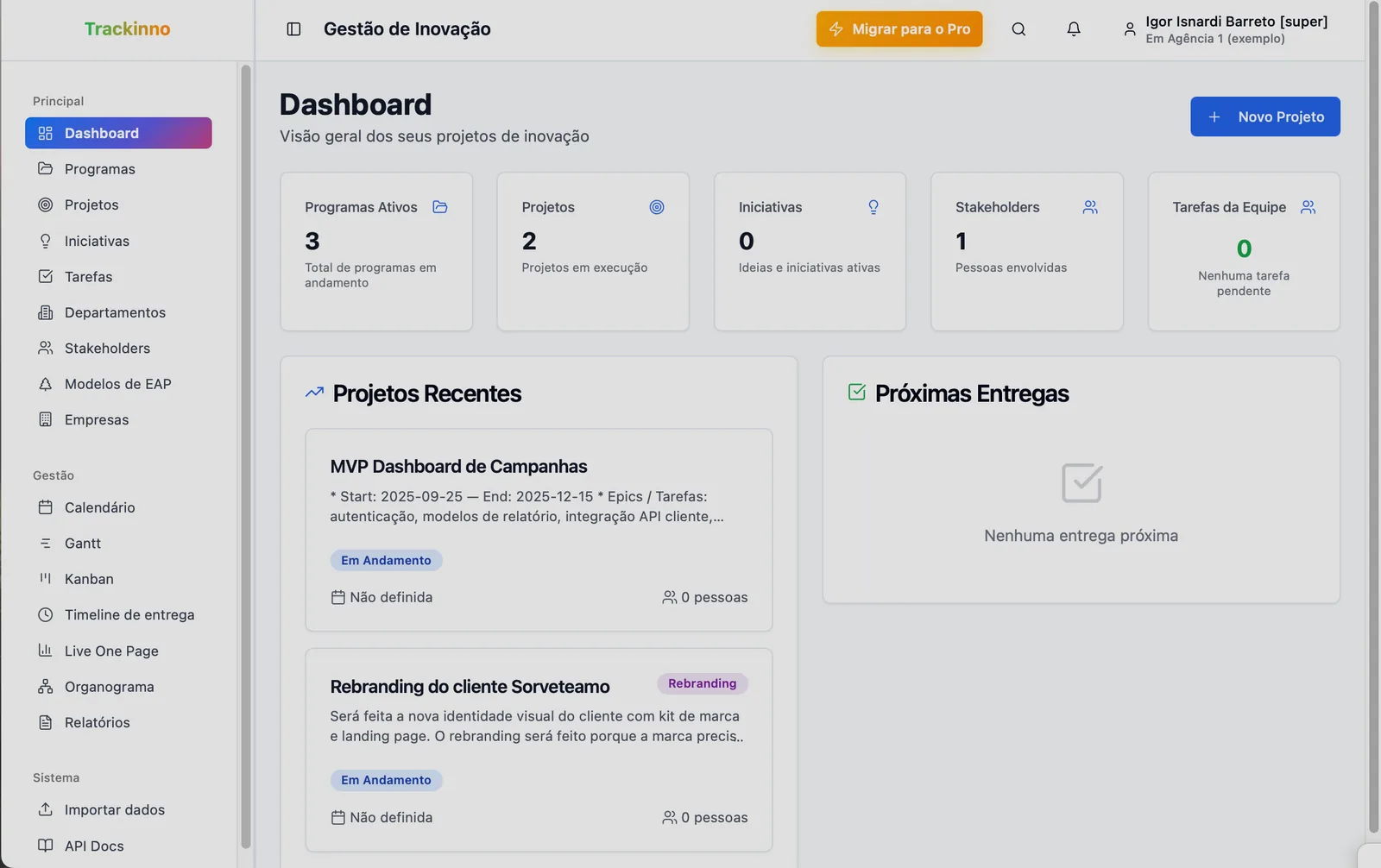
FIG. 01DASHBOARD · PROGRAMS, PROJECTS, INITIATIVES AND DELIVERABLES
01
The cost of winging it
Go Horse mode: sound familiar?
In Brazil, “Go Horse” is what teams call charging ahead with no plan. Improvised management never shows up on the cost sheet. It shows up as rework, blown deadlines and two-hour meetings. Here are six warning signs — and how Trackinno answers each one.
How Trackinno fixes itThe Dashboard, Portfolio Management and Live One Page show planned vs. actual and bottlenecks in real time. see it in the tour
How Trackinno fixes itGantt with planned vs. actual, chained dependencies and task-by-task delay alerts. see it in the tour
How Trackinno fixes itS-curve, Burndown and the Reliability index measure the gap between what was promised and what was delivered. see it in the tour
How Trackinno fixes itThe Resource Heatmap and Effort Stack show workload by person and department — per day, week or month. see it in the tour
How Trackinno fixes itTrackinno Flow models, runs and measures the process — and the AI writes the SOP straight from the diagram. see it in the tour
How Trackinno fixes itThe AI reviews descriptions, pulls tasks and initiatives out of free text, and generates reports and SOPs. see it in the tour
Do you actually know whether your projects are on schedule… or are you just hoping they are?
FIG. 02Trackinno overview · 92 seconds
In 92 seconds: a clear view of deadlines, performance and bottlenecks; metrics you can trust; projects structured and reviewed by AI; standardization that lets you scale. Less rework, less guesswork.
No Mind screenshot here — on purpose.
Sign in, sketch your map and link every node to a real project.
PPM, BPM, mind maps, innovation funding, AI and access governance in one place — a combination you rarely find in a single product. One login, nothing to install, no plugins to hunt down.
Programs, projects, initiatives, WBS and tasks in a single hierarchy. Portfolio Management gives leadership four views — strategic, tactical, operational and adoption — plus a Presentation Mode that turns them into slides for the meeting. Portfolio Planning simulates scenarios against your teams’ real capacity, without touching live records.
Gantt, Kanban, Calendar, Timeline, Burndown, S-curve, Resource Heatmap and Effort Stack
Task timer, comments with @mentions, attachments and a change history with justifications
Import from Excel; export to Excel and PDF; REST API and Sankhya ERP integration
10 ready-made reports, plus the Lei do Bem PDF report
Model in BPMN with the built-in editor and run instances with per-step SLAs, automatic assignment to whoever is least busy, and rule-based gateway decisions. Three-level Governance surfaces bottlenecks, rework and lead time. Triggers launch flows by date, recurrence or event — no one has to remember to press the button.
BPMN editor with swimlanes per department, undo/redo and export to XML, image and PDF
AI-generated SOP following the ISO 9001 structure, flagged when the diagram changes
Execution record as a .docx and a full audit trail for every step
Look up Sankhya products, prices and taxes right inside the sales proposal
Interactive mind maps with zoom, pan and free-form editing — and every node can link to an actual program, project, task or process. Lay out your strategy, product tree or annual plan, then jump straight from the map into execution.
Canvas with zoom, pan and node editing
Link nodes to real Trackinno records
Three categories: curated by Trackinno, company-public and private
Change history
Register every source — company cash, FINEP, PIPE FAPESP, a partner — with planned, spent and available amounts. Link them to projects, log every transaction and produce the Funding Source Management report. For R&D teams, the Lei do Bem report (Brazil’s R&D tax incentive) comes out as a PDF, project by project.
Planned × spent × available per source, with period and owner
WBS template for writing grant and funding proposals
Innovation project template on the 9-level TRL scale
Lei do Bem report (Law No. 11,196/2005) as a PDF
Ten AI features, from the form to the meeting. It scores descriptions against 5W2H and objectives against SMART, pulls tasks with RACCI roles out of plain text, turns meeting minutes into initiatives, reads your Burndown and S-curve and recommends what to do, generates the process SOP and answers questions about your data.
A 1-to-5 score with the criteria met and suggested rewrites
Text-to-Tasks and Text-to-Initiatives
Trackinno Reflection: chart analysis with recommendations
Trackinno Assistant: chat about your projects that respects your permissions
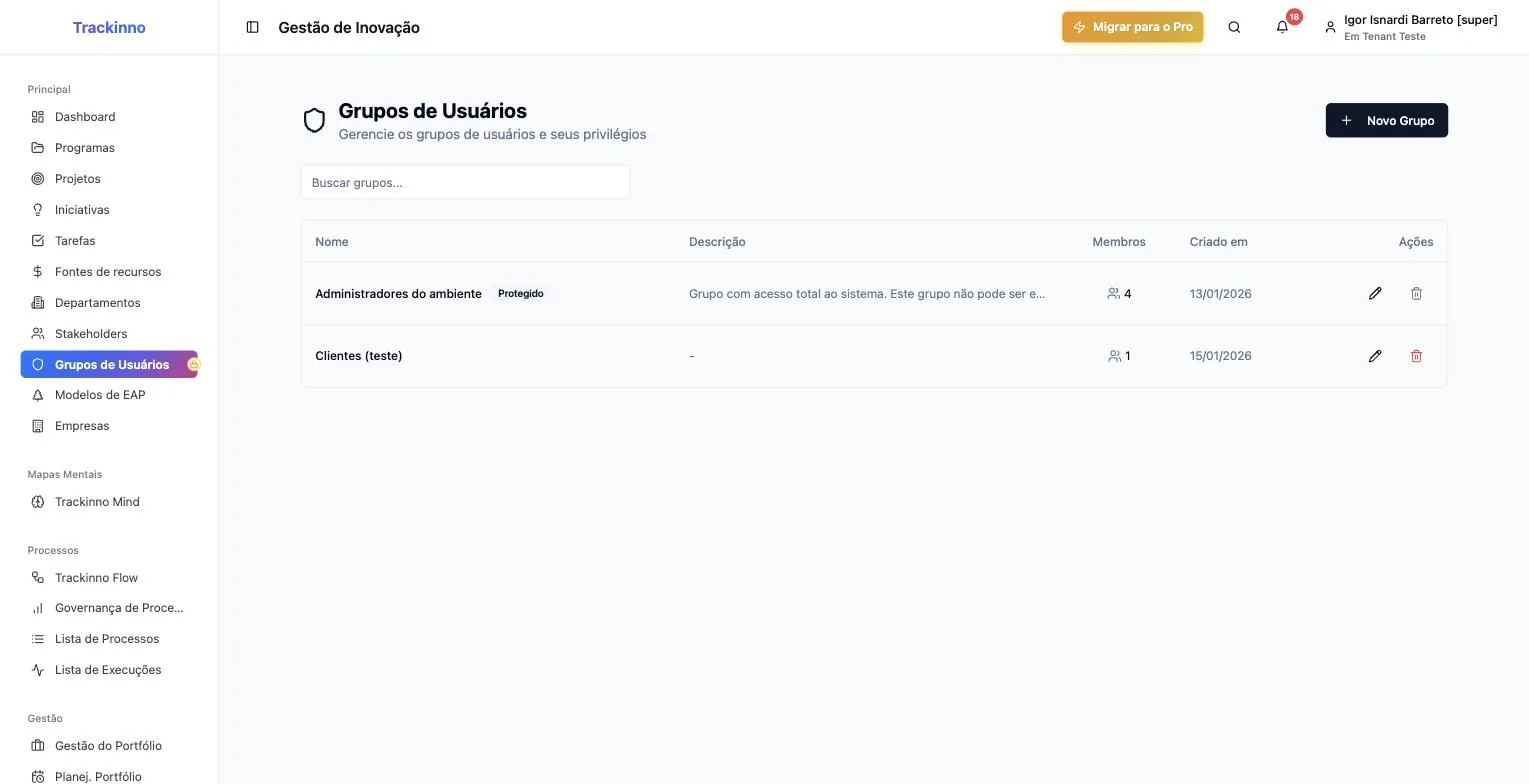
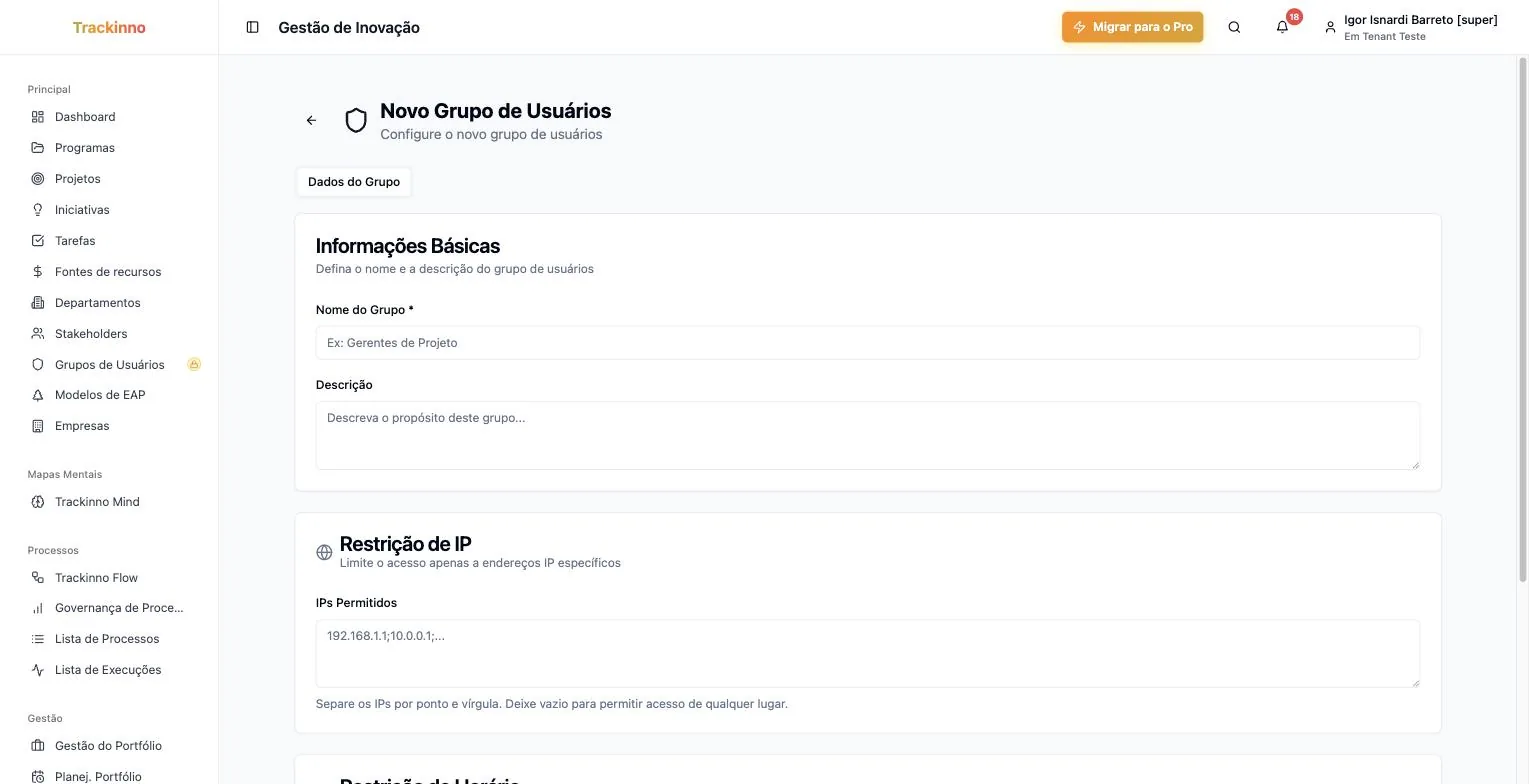
Every company runs in a workspace isolated from all others. User groups with 92 permissions and access grants per program and project, enforced in the interface, in search, in the AI assistant and in the API. Soft deletes, a change history with justifications, and daily backups.
4 roles and 92 permissions configurable per group
IP and time-of-day restrictions, group by group
Audit trail with visual diffs and change justifications
End-to-end HTTPS and daily backups
03
Product tour
Real screens. No mockups.
Nine Trackinno screens exactly as they look today. Scroll through each one and see what the screen does — and what it fixes in your week.
Screen 1 of 9
Dashboard: where Monday starts
Active programs, projects in progress, initiatives, stakeholders and the team’s tasks — at a glance. Upcoming deliverables with a countdown. And the Trackinno Assistant lives right here, so you can ask about your data instead of hunting for it.
What you get
Screen 2 of 9
Unified Gantt, with real dependencies
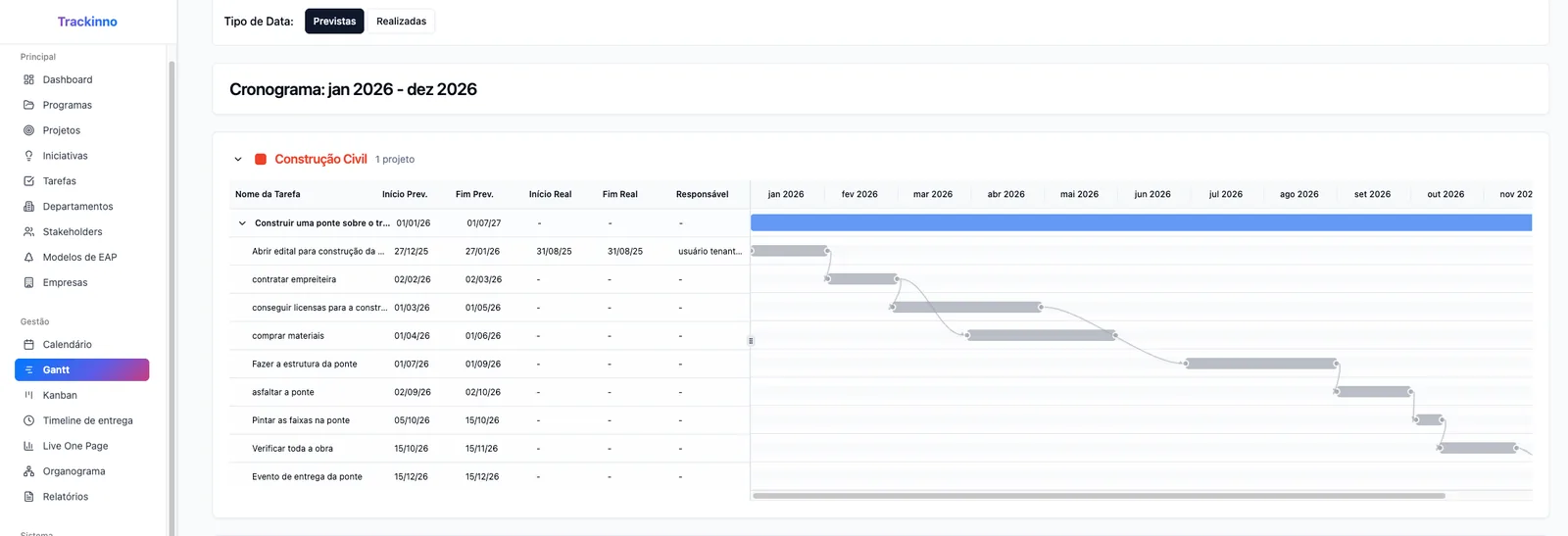
Program → project → group → task on the same timeline. Dependency arrows, planned and actual dates side by side, and drag-to-edit bars. Toggle between Planned and Actual to see exactly where the plan came unstuck.
What you get
Screen 3 of 9
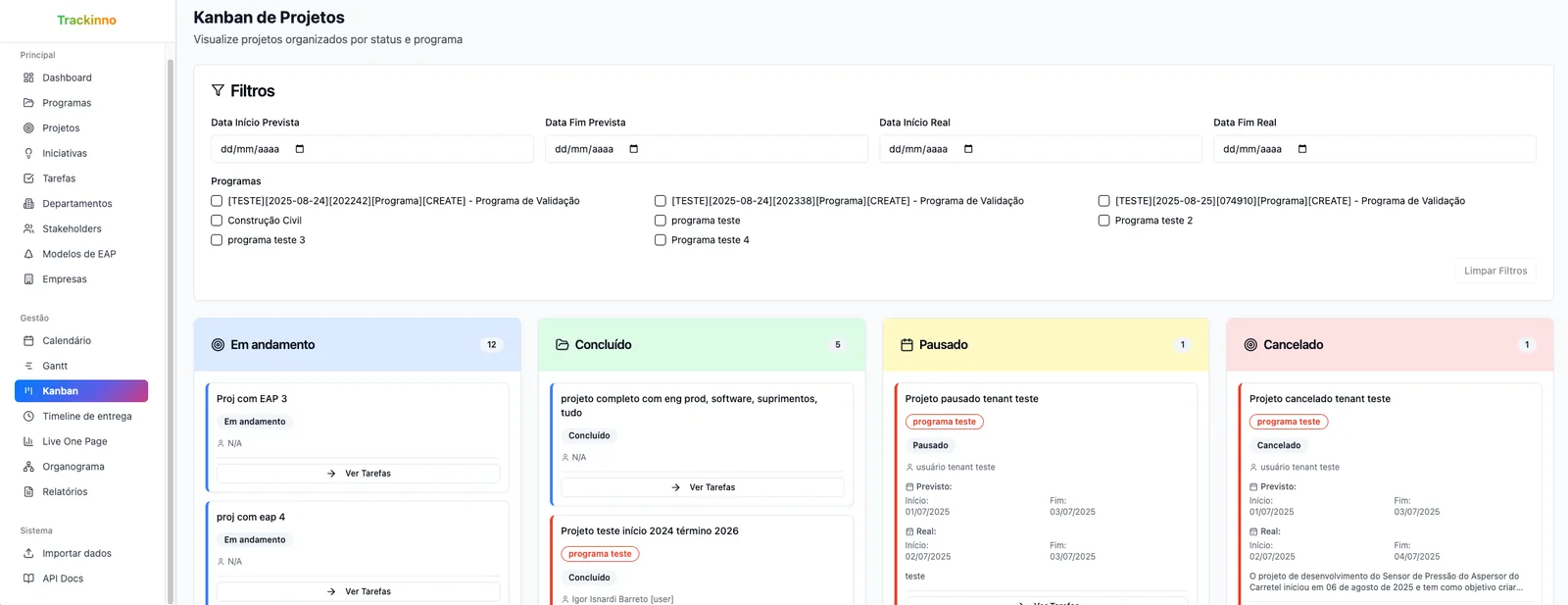
Project Kanban, filtered your way
Projects by status and by program, with filters for planned and actual dates. Every card takes you straight to its tasks. For day-to-day teamwork, Trello-style task boards — protected, public or private — with custom lists and labels, due-date columns and Excel export.
What you get
Screen 4 of 9
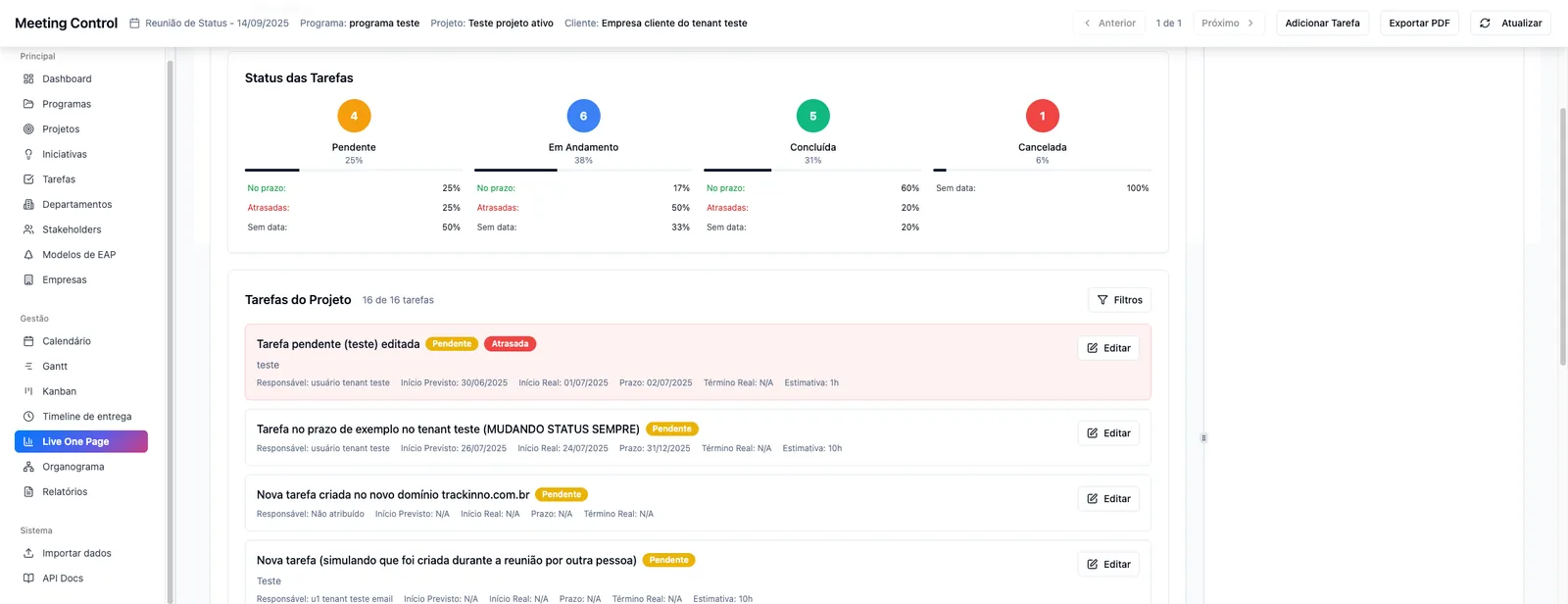
Live One Page: status meetings without building slides
A meeting mode that walks through your projects one by one: summary, KPIs, WBS, Gantt, Burndown and S-curve. The agenda is saved, tasks get created live during the conversation and the PDF is ready at the end. Nobody builds a deck the night before.
What you get
Screen 5 of 9
Trackinno Flow: draw the process, then run it
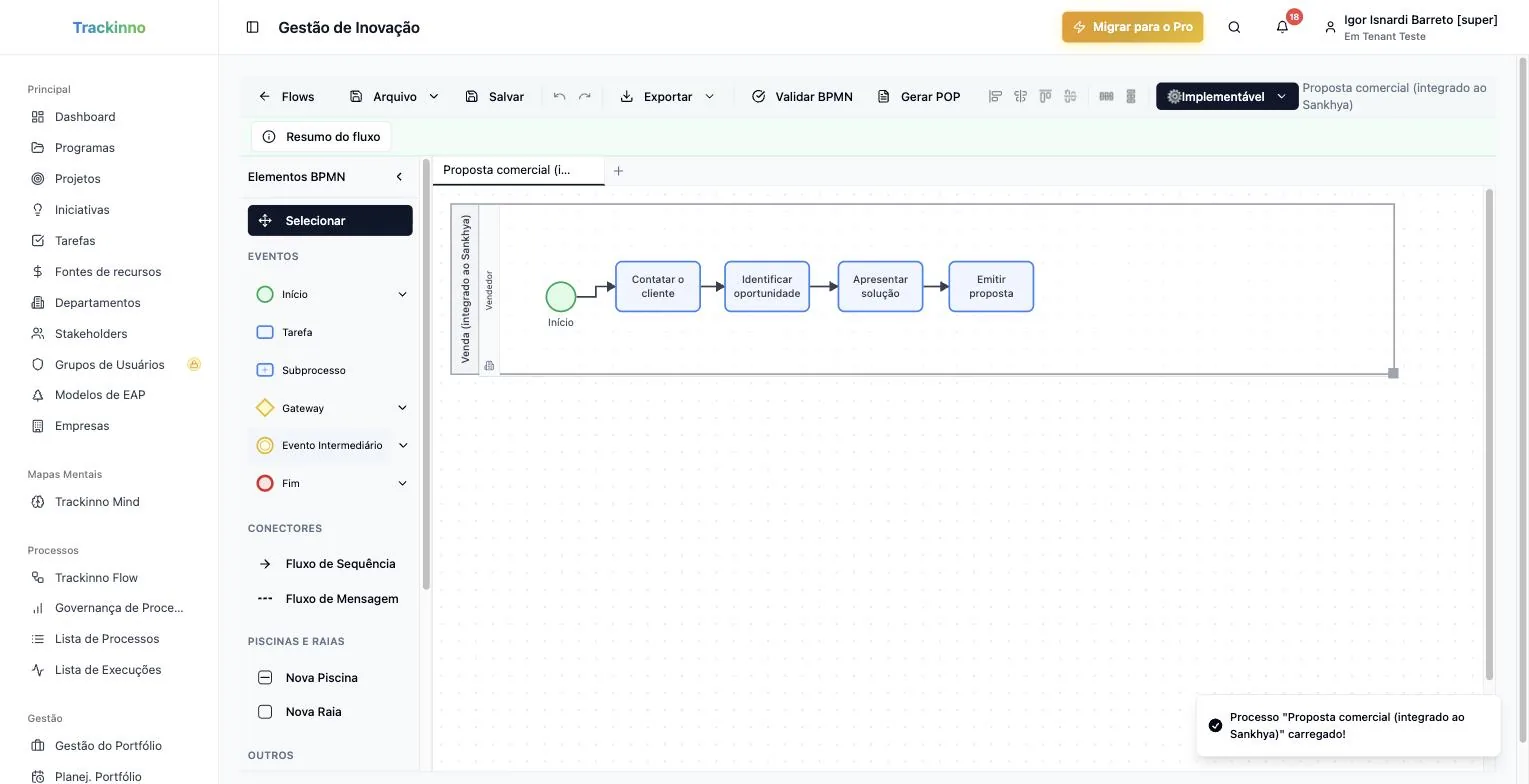
A built-in BPMN editor: pools and swimlanes per department, events, tasks, gateways and subprocesses. Every step gets an SLA, an assignment rule, custom fields and required documents. Validate BPMN and Generate SOP are one click away — and the diagram becomes an executable instance.
What you get
Screen 6 of 9
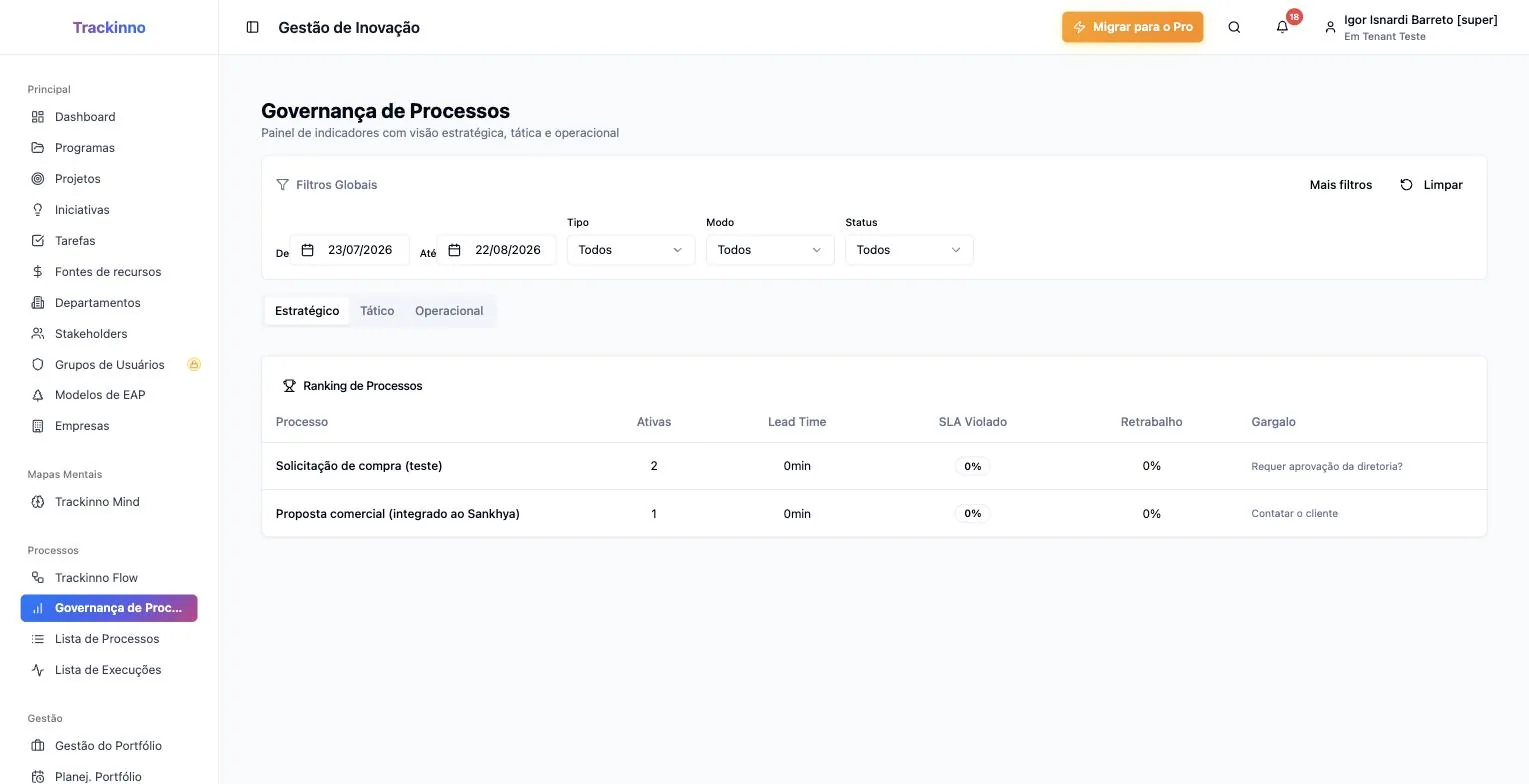
Process Governance on three levels
Strategic, tactical and operational. Execution volume, lead time, SLA breaches, rework and the bottleneck step for every process. The Flow Health Score answers the question that matters: is the process healthy, or just running?
What you get
Screen 7 of 9
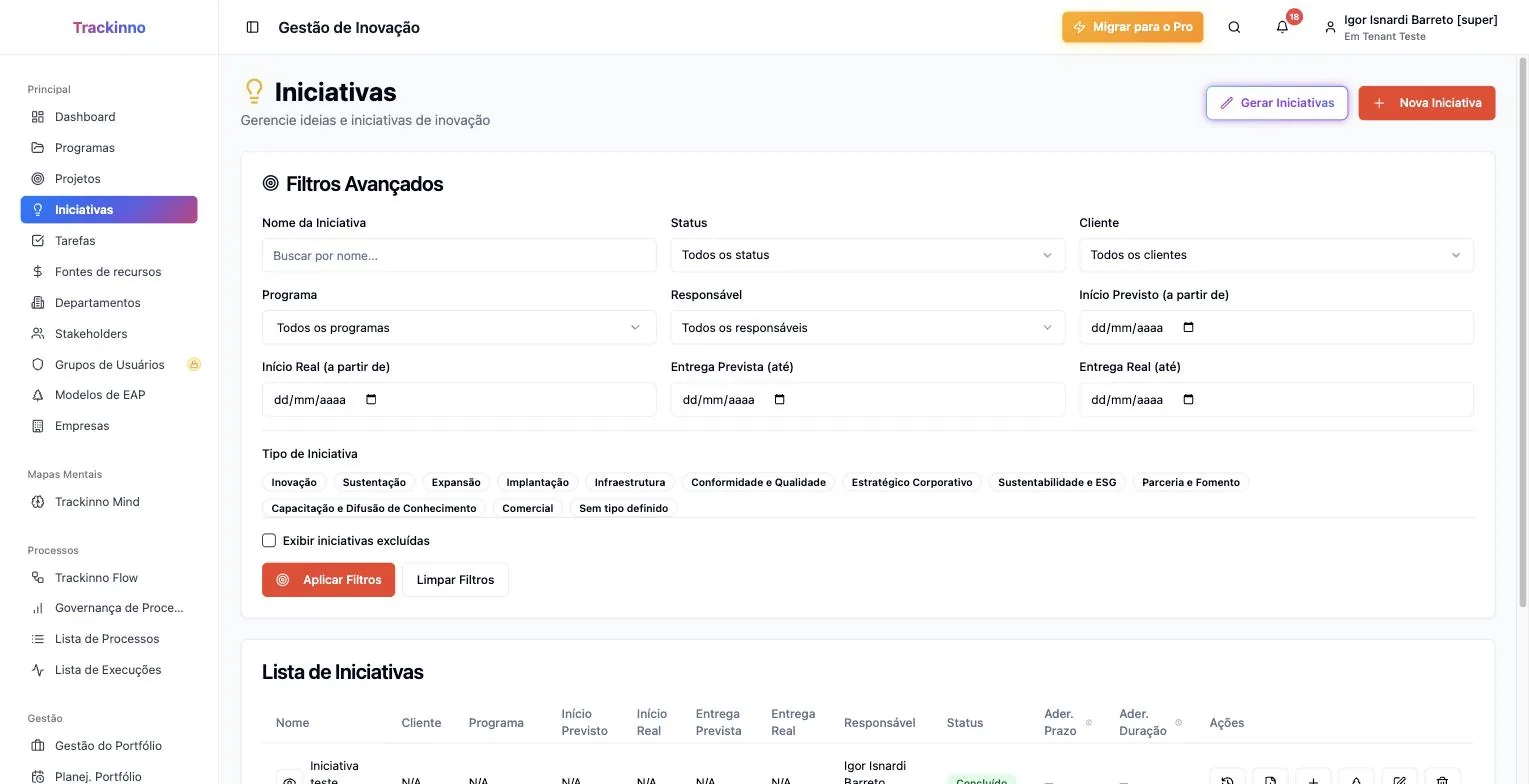
Initiatives: the funnel before the project
Ideas come in as initiatives — with type, customer, program, owner and dates — and go through advanced filters before becoming projects. The Generate Initiatives button uses AI to turn meeting minutes into structured initiatives. Approved? Convert it into a project without retyping a thing.
What you get
Screen 8 of 9
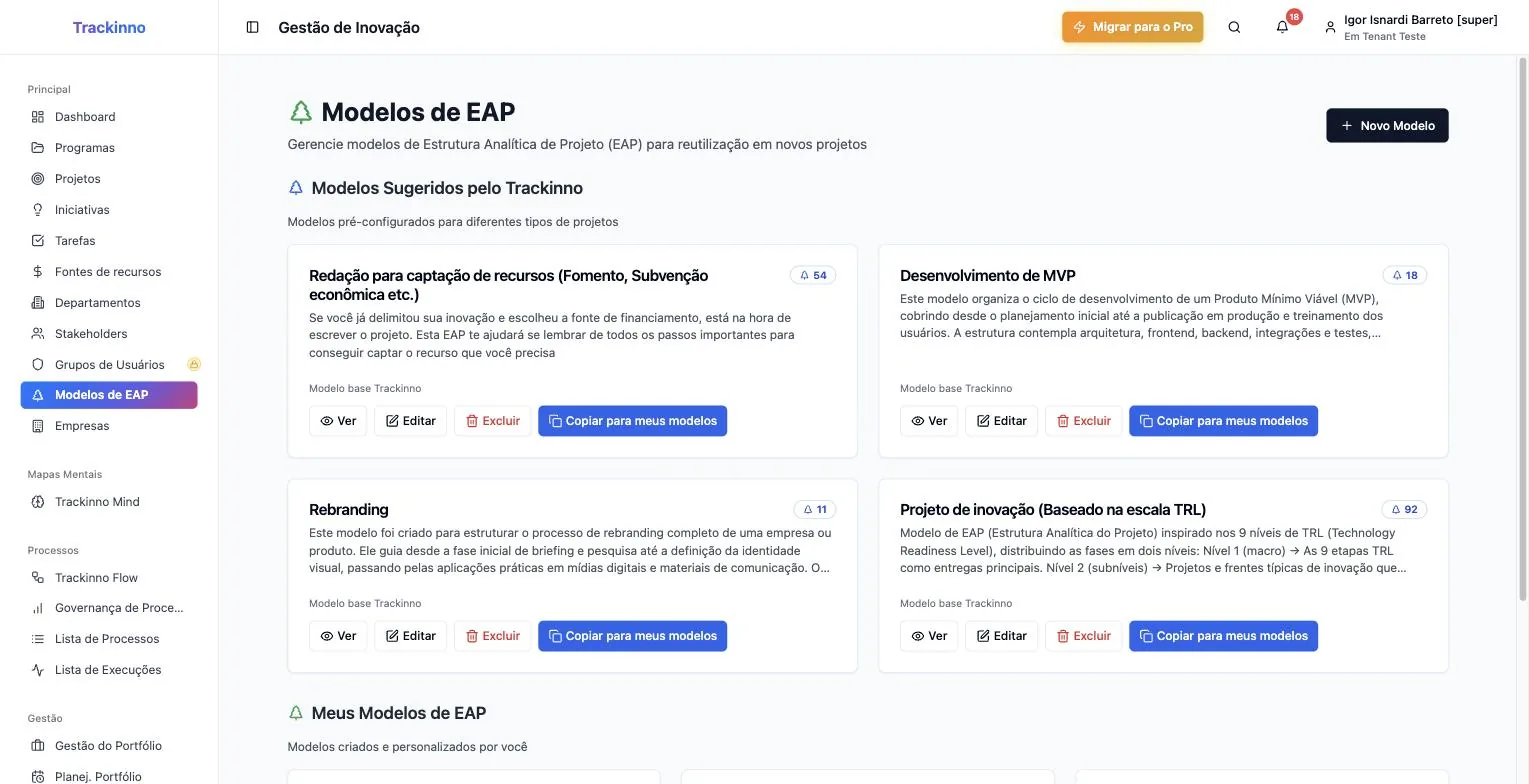
WBS templates: start from what already works
Four templates suggested by Trackinno — grant proposal writing, MVP development, rebranding and an innovation project on the TRL scale — with work packages, template tasks, team and relative dates. Copy, adapt and save it as your own.
What you get
Screen 9 of 9
Funding Sources: every project dollar has an address
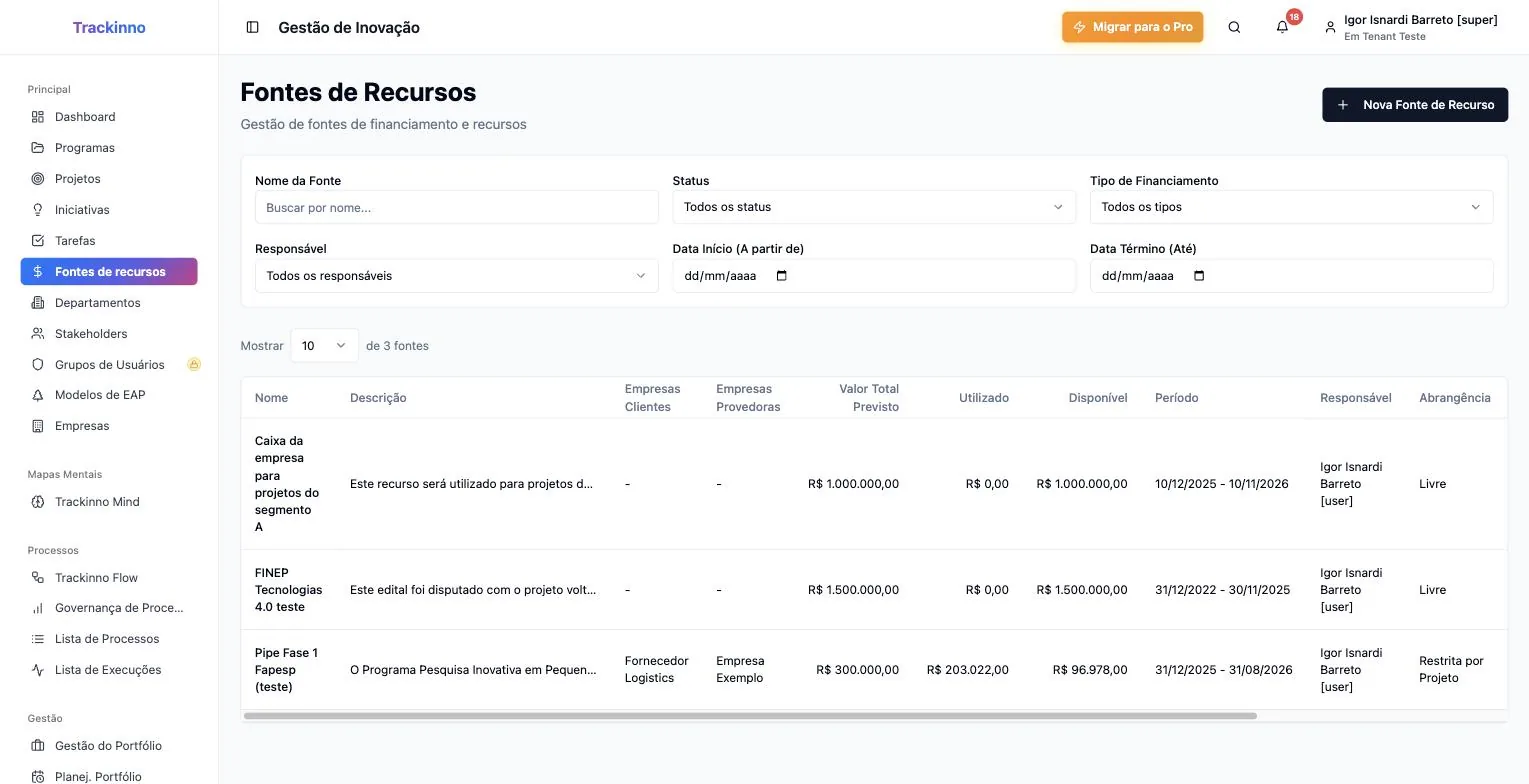
Company cash, a FINEP funding call, PIPE FAPESP: each source with planned, spent and available amounts, period, owner and scope. Link it to the project, track the transactions and produce the Funding Source Management report.
Ten AI features built into the way you work, every one with a history. Click any of them and try the simulation alongside:
A 1-to-5 star score, which of the seven criteria are met, and suggested rewrites. Before a poorly written project ever gets started.
The same evaluation at the task level. Whoever picks it up knows exactly what to do without having to ask.
A score, the S-M-A-R-T checklist and a rewritten objective for you to approve or tweak.
A chat about your own data: which projects are slipping this month, what’s due on Friday. It respects your permissions and keeps your conversation history.
Paste in the meeting notes. The AI extracts the tasks with responsible, approver and consulted (RACCI) — and skips duplicates.
From meeting minutes or a brainstorm to structured initiatives, ready for the innovation funnel.
The AI reads the chart, explains the variance and recommends what to do. Analysis, not just numbers.
A Standard Operating Procedure in the ISO 9001 structure, generated from the diagram. It warns you when the process has changed and the SOP is out of date.
When an instance finishes, you get a versioned .docx with everything that happened: steps, decisions, documents.
Rearranges the portfolio scenario around each department’s weekly capacity. Without changing your live records.
It’s not a crystal ball. It’s criteria.
Pick a feature from the list to switch the simulator.
Our AI quality score and cross-project views cut down on rework. And the method comes built in — you don’t have to teach the tool how to manage.
Phil playing the portfolio, not the task
vs. Trello / ClickUp
More than tasks
Any tool can organize tasks. Trackinno evaluates the quality of what’s written — descriptions against 5W2H, objectives against SMART — before a task turns into rework.
vs. Jira
Portfolio-ready out of the box
Cross-project views, Gantt from program down to task, Portfolio Management in four views and executive reports ready to present — no plugins and no consultants needed to set it up.
vs. Monday
Built for innovation
Initiatives, funding calls, TRL-based WBS and the Lei do Bem report are native — not improvised columns. And the AI understands innovation work, scoring the objectives and rationale of R&D projects.
Theory + Technique + AI
It’s not just a tool — it’s a method. Three frameworks live inside the forms, and the AI makes sure they get used.
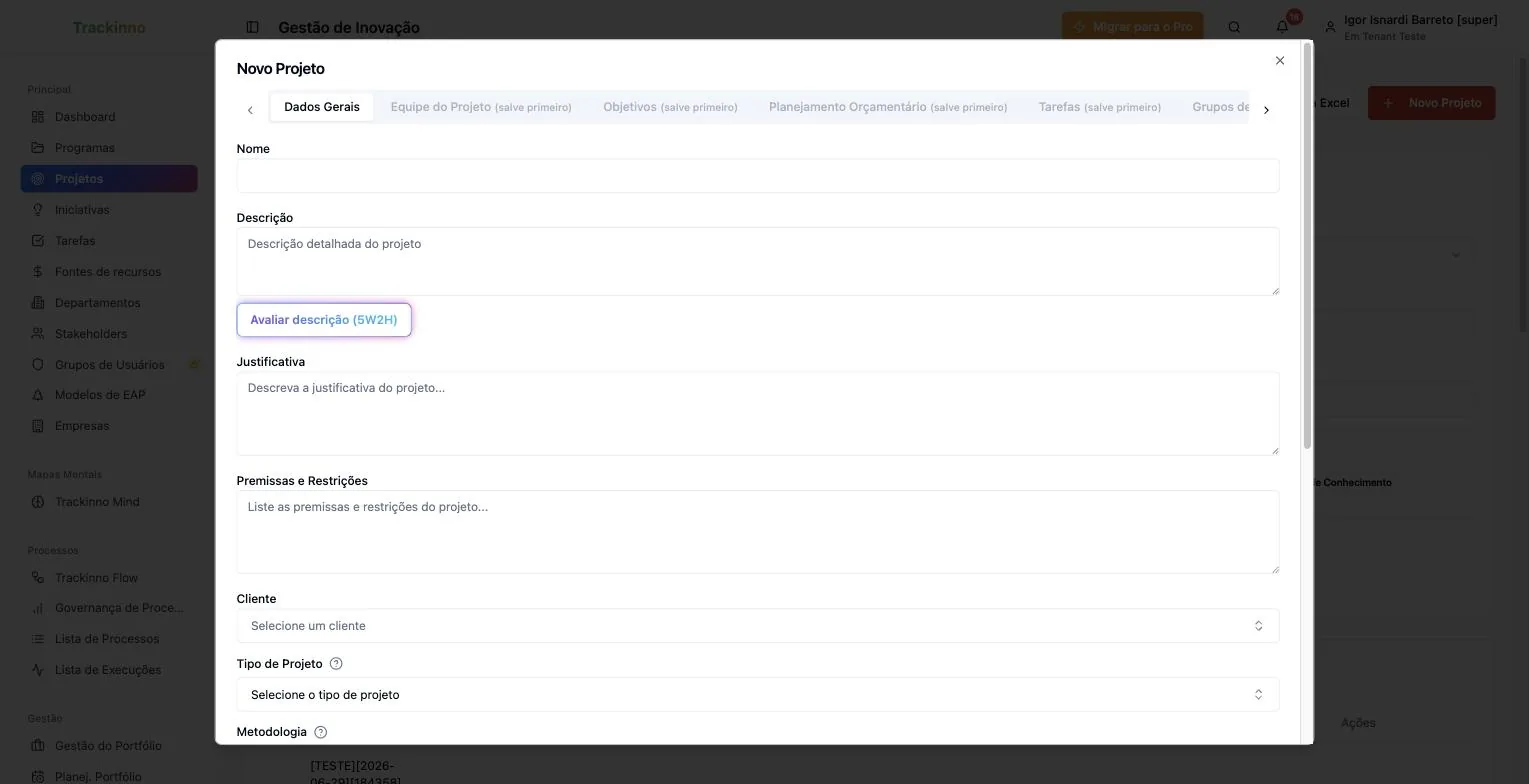
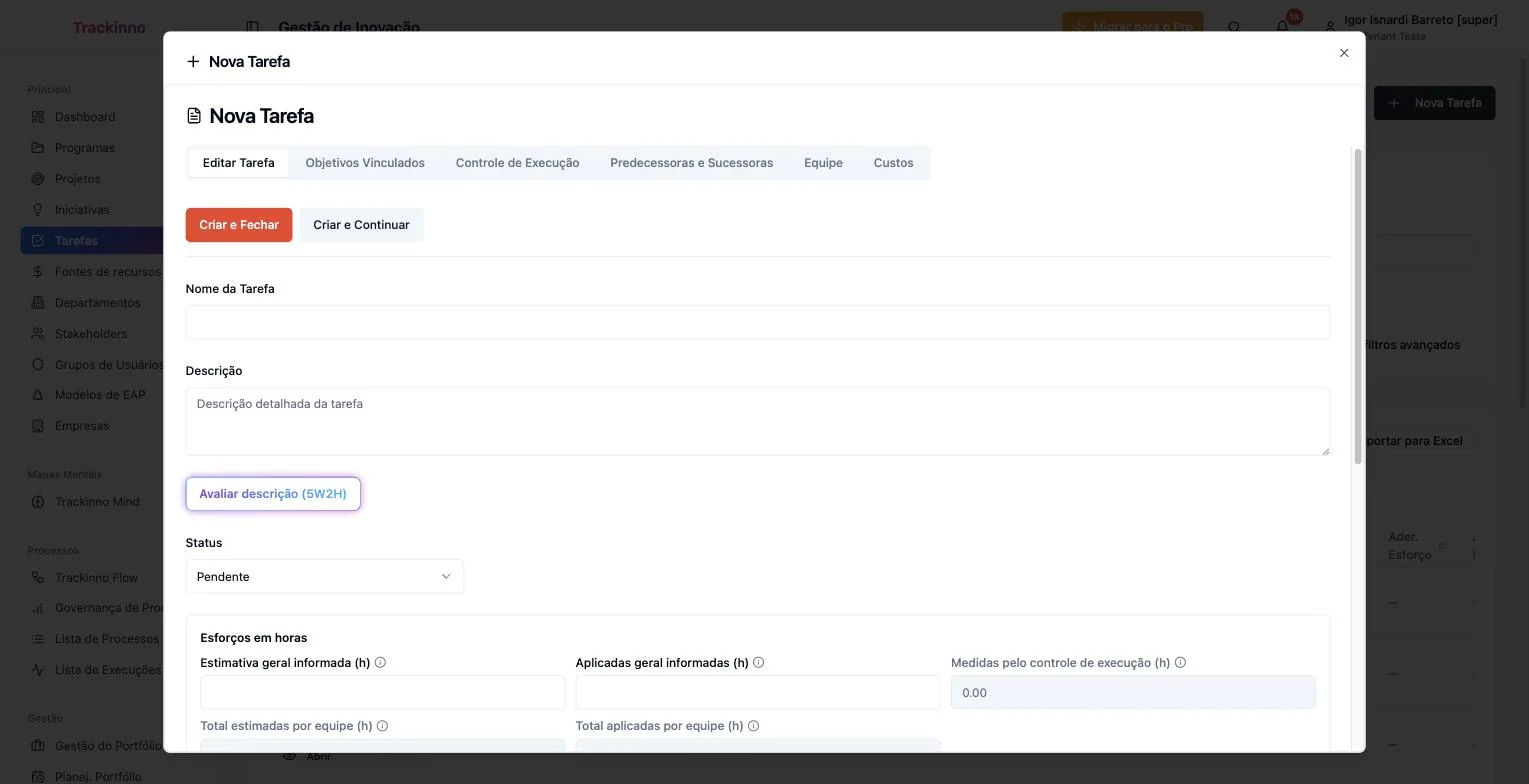
Why · What · Who · When · Where · How · How much
Seven questions every project and task description needs to answer. The AI checks them one by one, gives a 1-to-5 score and suggests a rewrite.
Project form · Description field and the Evaluate description (5W2H) button · See the full screen
Specific · Measurable · Attainable · Relevant · Time-bound
A good objective is one you can measure. The SMART evaluator scores it, shows the checklist and rewrites the objective for you to approve.
Project form · Objectives tab, where the SMART evaluator gives its score · See the full screen
Five questions, honest answers, results from Phil. Nobody’s watching.
Phil investigating your management style
Go HorseManagement
Where to start
07
Real numbers from a product in production
Data as of Jul 11, 2026 · source: production database
40
customer workspaces
In production as of Jul 11, 2026
Every company gets its own isolated workspace. No data crosses the boundary — not even by accident.
163
active users
In production as of Jul 11, 2026
People with an active login in customer workspaces, counted in the production database.
288
projects created
In production as of Jul 11, 2026
Projects created by real customers, with WBS, tasks and team.
3,608
tasks in progress or done
In production as of Jul 11, 2026
Tasks created by customers, each with an owner, a deadline and a history.
10
built-in AI features
From the 5W2H evaluator to the conversational assistant
Ten places in the product where AI reads what you wrote: from the 5W2H evaluator to the conversational assistant.
10
ready-made reports
Plus a per-project PDF report for Brazil’s R&D tax incentive (Lei do Bem)
Ten reports ready to generate, plus the per-project Lei do Bem PDF.
65+
screens in the product
PPM, Flow, Mind, portfolio and administration
Sixty-five screens: PPM, Flow, Mind, portfolio and administration.
9
views of the same project
Gantt, Kanban, Calendar, Timeline, Burndown, S-curve, Heatmap, Effort Stack and Org Chart
The same data, nine ways to look at it: from the schedule to the team workload heatmap.
08
Who uses it
Running in real operations, every day.
Amazing!!! Loved it — the projects team is using it, continuous improvement! We brought so many controls into one place! Highly recommend!
DMDjessica Matte · Executive Director
Grupo AGTech: pilot customer and reference case
Grupo AGTech, an agtech company, runs Trackinno day in, day out to manage its innovation portfolio, PMO, funding calls and executive reporting. That is the environment where the product was validated in real operations — and where it has been battle-tested from day one.
Phil sealing the deal
Isolated workspaces
Every company in a workspace of its own. Nobody sees another customer’s data: not by accident, not through the API.
Access under control
4 roles, 92 permissions per group and access grants per program and project. Enforced in the interface, in search, in the AI assistant and in the API.
Nothing disappears without a trace
Soft deletes, a change history with justifications, and visual diffs. You know who changed what — and why.
Daily backups, no drama
Automatic backups every day. Everything in transit goes over HTTPS.
FIG. 17User groups · 92 permissions, 4 roles, IP and time-of-day restrictions
No fine print
Notification bot for Microsoft Teams available now; Google Chat is on the way. REST API available today.
Security built on certified partners: data and authentication on Supabase (SOC 2) and payments through Stripe (PCI DSS).
Support by email and through the ticket portal, during business hours (Brasília time).
09
On YouTube
See Trackinno in action
Discover what AI-powered project management can do in short, practical videos — from the 92-second overview to Phil’s shorts. Videos are in Portuguese.
Video courses, written material and an exam with a certificate at Trackinno University. Some courses are free for customers; others are exclusive tracks for anyone who wants to go deeper into project management, processes and innovation.
A certificate at the end of every course. The exclusive tracks will be available for individual purchase, by customers and non-customers alike. Courses are in Portuguese.
Free for customers
Included
Getting startedFrom first login to first project: workspace, team, WBS and tasks in one short track.
Workspace administrationUser groups, permissions, departments, data import and integrations.
Exclusive tracks
Coming soon
Project management in practice5W2H, SMART, RACCI, WBS and Gantt applied to your portfolio, with hands-on exercises inside the product.
Processes that runBPMN modeling, SLA-driven execution, governance and SOPs: from diagram to metric.
Innovation and fundingFrom the initiative funnel to the funding call: TRL, Lei do Bem and grant reporting.
Phil teaching a class
11
Simple pricing
One plan. One price. Zero fine print.
Create your account and use every Pro feature free for 7 days. Like it? Subscribe to Pro and keep everything unlocked. Don’t like it? You pay nothing.
Billing
What will it cost for your team?
Drag the slider and see. No catch.
R$ 399.00per month
10 people × R$ 39.90
Every person added to the workspace counts as a user, whether they log in or not. Discount coupons apply at checkout. Cancel anytime.
How we count users
Every person added to the workspace counts as one user, whether they log in or not. If they get assigned tasks, have their hours tracked or appear on the org chart, they’re a user. Example: a project with one manager and a team of ten uses eleven licenses.
1
Create your account
Email, password and company name. Your workspace is ready in minutes — nothing to install.
2
Use Pro for 7 days
Every feature unlocked, no card. Invite the team, import from Excel, put the AI to the test.
3
Subscribe to Pro
Like it? Subscribe by card, per active user. Cancel or scale down anytime.
Monthly or annual — you choose at checkout. On the annual plan, each user costs R$ 430.92 per year (about 10% off the monthly price).
12
Frequently asked questions
Can’t find it? Open a ticket at chamados.trackinno.com.br.
What’s the difference between the free trial and Pro?
For 7 days, nothing. The trial unlocks every Pro feature: unlimited users and projects, AI, advanced reports and Live One Page. After that, you subscribe to Pro to keep everything.
How does billing work?
Per user, by credit card, in two options: monthly (R$ 39.90 per user per month) or annual (R$ 430.92 per user per year, about 10% cheaper). Every person added to the workspace counts as a user, whether they log in or not: a project with one manager and a team of ten means eleven licenses. No setup fee.
Do I need a credit card to try it?
No. You create your account and get the full 7 days. You’re only charged when you subscribe to Pro, after the trial ends. Cancel anytime.
I have a coupon. Where do I use it?
At checkout. The discount shows up before you confirm your subscription.
Can I cancel or downgrade?
Anytime, with no fees. Your plan stays active until the end of the period you’ve already paid for.
What if I change plans in the middle of the month?
Upgrade: you only pay the prorated difference for the remaining days. Downgrade: the difference becomes a credit on your next invoice.
How long does it take to get up and running? Is there support?
Your account is ready in minutes, with nothing to install — it’s a web app. WBS templates and Trackinno University courses speed up your first steps. Support is by email and through the ticket portal (chamados.trackinno.com.br). For assisted rollouts and team training, get in touch.
Is my data safe? What about privacy law?
Every company has an isolated workspace. Access is managed through permission-based groups, everything is audited, deletes are soft (with a trail) and backups run daily. We handle personal data in compliance with the LGPD (Brazil’s General Data Protection Law), with public terms of use and privacy policy. The AI features use external providers (OpenAI and Google Gemini) solely to process the text you submit for evaluation.
No questions match that term. Open a ticket and we’ll get back to you.
13
Get started in minutes. 7 days of Pro, free.
Set up your first projects and see the AI working for you today. No card, no installation, no red tape.